
Next-Generation AI-Powered Image Editor
Revolutionary image and video editing powered by the latest state-of-the-art AI models, advanced WebGL filters, and professional-grade color processing tools.
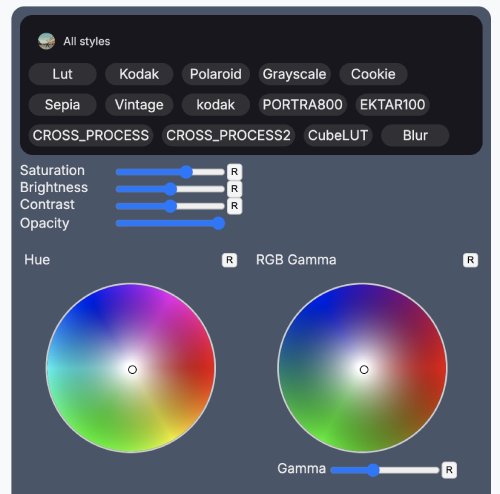
Built for creatives, by creatives. Our AI-powered image editor represents the cutting edge of digital content creation, combining the latest advances in artificial intelligence with intuitive design tools that professionals and enthusiasts alike can master.
Revolutionary AI-Powered Editing
Our image editor harnesses the power of the newest state-of-the-art (SOTA) AI models to deliver unprecedented editing capabilities. From simple adjustments to complex transformations, artificial intelligence enhances every aspect of your creative workflow.
Latest AI Models Integration
We integrate the most advanced AI models available today:
- DALL-E 3 & DALL-E 2: Revolutionary text-to-image generation with unprecedented quality and prompt adherence
- Stable Diffusion XL: Open-source powerhouse for high-resolution image generation and editing
- Midjourney Integration: Access to Midjourney's artistic AI capabilities directly within our editor
- Adobe Firefly: Commercial-safe AI generation trained on licensed content
- Runway ML Gen-2: Advanced video generation and editing capabilities
- ControlNet Models: Precise control over AI generation using depth, edges, poses, and more
State-of-the-Art Image Generation
Text-to-Image Creation
Transform your ideas into stunning visuals with natural language prompts:
- Advanced Prompt Engineering: Built-in prompt optimization for better results
- Style Transfer: Apply artistic styles from famous painters or create custom style profiles
- Composition Control: Specify layouts, perspectives, and visual elements with precision
- Negative Prompts: Fine-tune results by specifying what to avoid
- Aspect Ratio Control: Generate images in any dimension or format
Image-to-Image Transformation
- Style Transfer: Transform photos into paintings, sketches, or any artistic style
- Content-Aware Editing: Modify specific elements while preserving overall composition
- Upscaling & Super Resolution: AI-powered upscaling up to 8K resolution
- Inpainting & Outpainting: Seamlessly add or remove content from any image
- Pose & Expression Editing: Modify human poses and facial expressions naturally
Advanced Video Editing Capabilities
AI-Powered Video Generation
Create and edit videos with the same AI sophistication as our image tools:
- Text-to-Video: Generate video clips from text descriptions
- Image-to-Video: Animate static images with natural motion
- Video Inpainting: Remove or replace objects in video sequences
- Motion Transfer: Apply motion patterns from one video to another
- Style Consistency: Maintain visual style across video frames
Professional Video Tools
- Temporal Stabilization: AI-powered stabilization that understands motion
- Automatic Rotoscoping: AI-assisted masking and selection
- Noise Reduction: Machine learning-based noise removal
- Frame Interpolation: Increase frame rates with AI-generated intermediate frames
- Color Matching: Automatically match color grading across clips
Professional Color Processing
Advanced Color Science
Our color processing engine delivers professional-grade results:
- Wide Color Gamut Support: Adobe RGB, ProPhoto RGB, Rec. 2020, and DCI-P3
- 16-bit Processing: Maintain color fidelity with high bit-depth processing
- Color Profile Management: Accurate ICC profile handling and conversion
- HDR Processing: Full HDR10 and Dolby Vision support
- ACES Workflow: Industry-standard color pipeline integration
Intelligent Color Tools
- AI Color Grading: Automatic color correction based on scene analysis
- Selective Color Replacement: Change specific colors while preserving others
- Skin Tone Protection: Intelligent algorithms that preserve natural skin tones
- White Balance AI: Automatic white balance correction using machine learning
- Color Harmony Analysis: Suggestions for pleasing color combinations
Cutting-Edge WebGL Filters
GPU-Accelerated Processing
Leverage the full power of modern graphics cards with our WebGL-based filter system:
- Real-Time Processing: See changes instantly with hardware acceleration
- Custom Shader Support: Import and create custom GLSL shaders
- Multi-Pass Effects: Complex effects combining multiple processing stages
- Compute Shader Integration: Ultra-fast processing for complex operations
- Cross-Platform Performance: Optimized for desktop, mobile, and web
Professional Filter Library
- Lens Corrections: Distortion, vignetting, and chromatic aberration removal
- Film Emulation: Accurate emulation of classic film stocks
- HDR Tone Mapping: Multiple algorithms for HDR to SDR conversion
- Noise Reduction: Advanced denoising with detail preservation
- Sharpening Algorithms: Unsharp mask, capture sharpening, and output sharpening
- Artistic Effects: Oil painting, watercolor, pencil sketch, and more
Essential Editing Functions
Smart Cropping and Composition
AI-enhanced tools for perfect composition:
- Rule of Thirds Grid: Intelligent guides for better composition
- AI Crop Suggestions: Automatic cropping recommendations based on content analysis
- Aspect Ratio Presets: Social media, print, and custom format presets
- Content-Aware Cropping: Intelligent cropping that preserves important elements
- Straightening Detection: Automatic horizon and perspective correction
Intelligent Expand and Extension
- AI Outpainting: Seamlessly extend images beyond their borders
- Context-Aware Fill: Generate new content that matches the existing image
- Pattern Recognition: Automatically continue patterns and textures
- Perspective Extension: Maintain proper perspective when extending images
- Seamless Blending: Perfect transitions between original and generated content
Advanced Background Processing
AI Background Removal
State-of-the-art background removal powered by multiple AI models:
- Human Subject Detection: Specialized models for portrait background removal
- Object Segmentation: Precise isolation of products, vehicles, and objects
- Hair Detail Preservation: Advanced algorithms for fine hair and fur details
- Edge Refinement: Sub-pixel precision for perfect edges
- Transparency Support: Full alpha channel processing for professional compositing
Background Replacement and Enhancement
- AI Background Generation: Create custom backgrounds from text descriptions
- Environmental Matching: Automatic lighting and color matching for realistic composites
- Depth-Aware Compositing: Proper depth relationships between subject and background
- Shadow Generation: Realistic shadow creation based on lighting analysis
- Perspective Correction: Automatic perspective matching for believable composites
Professional Workflow Integration
Industry Standard Formats
Complete support for professional file formats:
- RAW Processing: Support for over 400 camera RAW formats
- PSD Compatibility: Full Adobe Photoshop file support with layers
- TIFF and PNG: High bit-depth image support
- Video Formats: ProRes, DNxHD, H.264, H.265, AV1, and more
- Vector Support: SVG, AI, and EPS file handling
Creative Cloud Integration
- Adobe Bridge Sync: Seamless integration with Adobe workflows
- Lightroom Synchronization: Two-way sync with Lightroom catalogs
- After Effects Export: Direct export to After Effects compositions
- Premiere Pro Integration: Timeline integration for video editing
- Plugin Architecture: Support for third-party plugins and extensions
Advanced Selection and Masking
AI-Powered Selections
- One-Click Subject Selection: Instantly select the main subject
- Sky Replacement: Automatic sky detection and replacement
- Hair Masking: Precise hair selection with fine detail preservation
- Color Range Selection: Select based on color similarity with tolerance control
- Luminosity Masks: Advanced luminosity-based selection tools
Professional Masking Tools
- Vector Masks: Scalable, editable vector-based masks
- Gradient Masks: Smooth transitions with customizable gradients
- Layer Masks: Non-destructive masking with full opacity control
- Clipping Masks: Shape-based masking for precise control
- Channel Masks: Create masks from any color channel
Real-Time Performance Optimization
Multi-Threaded Processing
Maximum performance on modern hardware:
- CPU Optimization: Full utilization of multi-core processors
- GPU Acceleration: CUDA and OpenCL support for compatible graphics cards
- Memory Management: Intelligent caching and memory usage optimization
- Progressive Rendering: Real-time previews with progressive quality improvement
- Background Processing: Continue working while operations process in background
Cloud Processing Options
- Remote AI Processing: Offload intensive AI operations to cloud servers
- Distributed Rendering: Use multiple cloud instances for complex operations
- Hybrid Processing: Automatically choose between local and cloud processing
- Progress Synchronization: Real-time updates on cloud processing status
Collaborative Features
Team Collaboration
Work together seamlessly on complex projects:
- Real-Time Collaboration: Multiple editors working on the same image simultaneously
- Version Control: Track changes and manage different versions
- Comment and Annotation: Add feedback directly to specific areas
- Approval Workflows: Client approval system with revision tracking
- Project Sharing: Share projects with granular permission control
Client Review System
- Client Portal Integration: Seamless integration with client portals
- Proof Sheets: Create professional proof sheets for client review
- Interactive Feedback: Clients can add comments and request changes
- Approval Tracking: Clear approval status for each image
- Delivery Management: Organize and deliver final files efficiently
Mobile and Cross-Platform Support
Universal Compatibility
Edit anywhere, on any device:
- Progressive Web App: Full functionality in any modern web browser
- Native Mobile Apps: iOS and Android apps with touch-optimized interface
- Desktop Applications: Native apps for Windows, macOS, and Linux
- Tablet Optimization: Special interface designed for iPad Pro and similar devices
- Sync Across Devices: Continue your work seamlessly across all platforms
Touch and Stylus Support
- Pressure Sensitivity: Full support for pressure-sensitive styluses
- Multi-Touch Gestures: Intuitive pinch, zoom, and rotate gestures
- Palm Rejection: Draw naturally without interference from palm contact
- Tilt Recognition: Stylus tilt support for natural drawing and painting
Learning and Automation
AI Learning System
The editor learns from your workflow to provide better assistance:
- Workflow Learning: AI observes your editing patterns and suggests optimizations
- Custom AI Models: Train custom models based on your specific style
- Predictive Tools: Suggest next steps based on current editing context
- Style Recognition: Automatically detect and apply your signature editing style
Automation and Batch Processing
- Action Recording: Record complex editing sequences for batch application
- Smart Batch Processing: AI-guided batch edits that adapt to each image
- Template System: Save and reuse common editing workflows
- Conditional Processing: Apply different edits based on image characteristics
Educational and Tutorial Integration
Built-in Learning
- Interactive Tutorials: Step-by-step guides for mastering features
- Technique Library: Professional editing techniques with video demonstrations
- AI Explanations: The AI explains its decisions and suggests improvements
- Progress Tracking: Monitor your skill development over time
Industry Applications
Photography
- Portrait retouching and enhancement
- Landscape photography optimization
- Wedding and event photography workflows
- Product photography and e-commerce
Graphic Design
- Logo and brand identity creation
- Marketing material design
- Social media content creation
- Print design and preparation
Digital Art
- Concept art and illustration
- Matte painting for film and games
- Character design and development
- Environmental art creation
Content Creation
- YouTube thumbnail creation
- Instagram and social media optimization
- Blog and website imagery
- Marketing and advertising visuals
Future Developments
Emerging AI Technologies
We continuously integrate the latest AI advances:
- 3D Image Generation: AI models that understand and generate 3D-aware images
- Neural Radiance Fields: NeRF integration for 3D scene reconstruction
- Multimodal AI: Models that understand images, text, and audio together
- Real-Time Ray Tracing: Hardware-accelerated realistic lighting and reflections
Advanced Features Roadmap
- Voice-controlled editing with natural language processing
- Augmented reality preview and editing capabilities
- Blockchain-based copyright and provenance tracking
- Quantum computing integration for complex processing
- Advanced motion graphics and animation tools
Performance and System Requirements
Minimum System Requirements
- CPU: Intel i5 / AMD Ryzen 5 or equivalent
- RAM: 8GB (16GB recommended for AI features)
- GPU: DirectX 12 / OpenGL 4.0 compatible
- Storage: 2GB free space (additional space for AI models)
- Internet: Required for AI processing and cloud features
Recommended Professional Setup
- CPU: Intel i9 / AMD Ryzen 9 or Apple M1 Pro/Max
- RAM: 32GB or more for complex projects
- GPU: NVIDIA RTX 4070 / AMD RX 7800 XT or better
- Storage: NVMe SSD for optimal performance
- Display: Color-accurate monitor with wide color gamut support
Security and Privacy
Data Protection
- Local Processing Options: Process sensitive images entirely on your device
- Encryption: End-to-end encryption for all cloud processing
- Privacy Controls: Granular control over what data is shared
- GDPR Compliance: Full compliance with privacy regulations
- Audit Trail: Complete tracking of image processing and sharing
Pricing and Accessibility
Flexible Subscription Options
- Individual Creator: Full access for individual users
- Professional Studio: Team collaboration features and advanced AI
- Enterprise: Custom deployments with dedicated support
- Educational: Special pricing for students and educational institutions
- API Access: Integrate our AI capabilities into your own applications
Conclusion
Our AI-powered image editor represents the pinnacle of creative technology, combining cutting-edge artificial intelligence with professional-grade tools that empower creators at every level. From simple background removal to complex artistic transformations, from basic color correction to advanced video generation, we provide the tools that modern creatives need to bring their visions to life.
Built on the latest state-of-the-art AI models and optimized with advanced WebGL processing, our editor delivers professional results with unprecedented ease of use. Whether you're a photographer perfecting portraits, a designer creating marketing materials, or a content creator developing social media assets, our platform provides the power, flexibility, and intelligence you need.
The future of image editing is here, and it's powered by artificial intelligence that understands not just pixels, but creativity itself. Join thousands of professionals who have already transformed their workflows with the most advanced image editing platform available today.
Experience the future of creative editing. Try our AI-powered image editor and discover what's possible when cutting-edge technology meets human creativity.